I do not know what is worse, having high blood pressure or the fact that my mum and my wife know about it
ffmpeg: Create a video countdown 1
The code below was used to generate the video countdown timers that are available in the following playlist using ffmpeg:
#This example will create a 3 second video, with 100 frames per second and it will print the elapsed and remaining times using a two second accuracy.
fps=100;
seconds=3;
mantissaDigits=2;
upperFont=600;
lowerFont=100;
ffmpeg -loop 1 -i ~/Pictures/Black-Background.png -c:v libx264 -r $fps -t $seconds -pix_fmt yuv420p -vf "fps=$fps,drawtext=fontfile='/usr/share/fonts/urw-base35/C059-Bold.otf':fontcolor=yellow:fontsize=$upperFont:x=(w-text_w)/2:y=(h-text_h)/2:text='%{eif\:($seconds-t)\:d}.%{eif\:(mod($seconds-t, 1)*pow(10,$mantissaDigits))\:d\:$mantissaDigits}',drawtext=fontfile='/usr/share/fonts/urw-base35/C059-Bold.otf':fontcolor=yellow:fontsize=$lowerFont:x=(w-text_w)/2:y=((h-text_h)/2)+$upperFont:text='Elapsed\: %{eif\:(t)\:d}.%{eif\:(mod(t, 1)*pow(10,$mantissaDigits))\:d\:$mantissaDigits}'" "$seconds seconds countdown timer.mp4";
Notes:
- We used a single black frame for the background that defined the size of the video frame as well.
- Using the
fpsvariable we defined the number ofFrames per Secondfor the video. - The
secondsvariable defined the number of seconds the duration of the video should be. - The
mantissaDigitsvariable defines how many decimal digits should be shown after thedot. upperFontandlowerFontdefine the size of the fonts in the upper row and the lower one respectively.- We used the
drawtextdirective twice to write to the frames.
Notes on the first drawtext:
fontfile='/usr/share/fonts/urw-base35/C059-Bold.otf'defines the font to be used for the text.fontcolor=yellowdefines the color of the font of the text.fontsize=$upperFontdefines the size of the font of the text.x=(w-text_w)/2defines the X-coordinate of the location for the text on the frame, here we center the text horizontally on the frame.y=(h-text_h)/2defines the Y-coordinate of the location for the text on the frame, here we center the text vertically on the frame.text='%{eif\:($seconds-t)\:d}.%{eif\:(mod($seconds-t, 1)*pow(10,$mantissaDigits))\:d\:$mantissaDigits}'We print the remaining seconds for the video to finish with specific decimal digit accuracy.
Notes on the second drawtext:
drawtext=fontfile='/usr/share/fonts/urw-base35/C059-Bold.otf'defines the font to be used for the text.fontcolor=yellowdefines the color of the font of the text.fontsize=$lowerFontdefines the size of the font of the text.x=(w-text_w)/2defines the X-coordinate of the location for the text on the frame, here we center the text horizontally on the frame.y=((h-text_h)/2)+$upperFontdefines the Y-coordinate of the location for the text on the frame, here shift the text from the vertical center of the frame.text='Elapsed\: %{eif\:(t)\:d}.%{eif\:(mod(t, 1)*pow(10,$mantissaDigits))\:d\:$mantissaDigits}'We print the elapsed seconds since the video started with specific decimal digit accuracy.
Qubes OS 3.2: Resize fedora-23 TemplateVM Root Image 1
Recently, we needed to increase the size of the root image for the fedora-23 TemplateVM.
We had to do this as we wanted to install in /opt a few IDEs, including android-studio which takes a lot of space when accompanied by the Android SDK.
Following the excellent guide at https://www.qubes-os.org/doc/resize-root-disk-image/, we did the following:
- Made sure that the
fedora-23TemplateVMand all VMs based on that template were shut down.
This included stopping thesys-firewallandsys-netVMs as well (in this order). - Then, in the
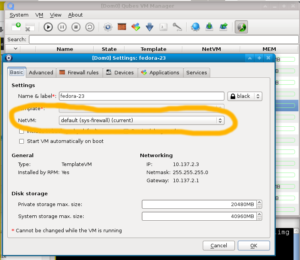
VM Settingswindow at theBasictab for thefedora-23TemplateVM, we disabled the networking by selectingnoneon theNetVM:drop-down list and pressedOKto apply the settings changes.

- Following, in
dom0Terminal Emulatorwe run the following command:
truncate -s 40G /var/lib/qubes/vm-templates/fedora-23/root.img; - Afterwards we started the
fedora-23TemplateVMand run the following in the terminal:
sudo resize2fs /dev/mapper/dmroot;
Please note that if your output isNothing to do!then most likely you forgot a VM that is based on thefedora-23TemplateVMrunning. Normally your screen should print something along the lines ofResizing the filesystem... - Next, we shut down the
fedora-23TemplateVM, and went to theVM Settingswindow to enable networking by selecting whatever we had there before (for us it wasdefault (sys-firewall)). - Finally, we could start using our VMs, their
root.imgwere of the new extended size.