Where can you leave your rocket when you’re in space?
On a parking meteor..

The code below was used to generate the video countdown timers that are available in the following playlist using ffmpeg:
#This example will create a 3 second video, with 100 frames per second and it will print the elapsed and remaining times using a two second accuracy.
fps=100;
seconds=3;
mantissaDigits=2;
upperFont=600;
lowerFont=100;
ffmpeg -loop 1 -i ~/Pictures/Black-Background.png -c:v libx264 -r $fps -t $seconds -pix_fmt yuv420p -vf "fps=$fps,drawtext=fontfile='/usr/share/fonts/urw-base35/C059-Bold.otf':fontcolor=yellow:fontsize=$upperFont:x=(w-text_w)/2:y=(h-text_h)/2:text='%{eif\:($seconds-t)\:d}.%{eif\:(mod($seconds-t, 1)*pow(10,$mantissaDigits))\:d\:$mantissaDigits}',drawtext=fontfile='/usr/share/fonts/urw-base35/C059-Bold.otf':fontcolor=yellow:fontsize=$lowerFont:x=(w-text_w)/2:y=((h-text_h)/2)+$upperFont:text='Elapsed\: %{eif\:(t)\:d}.%{eif\:(mod(t, 1)*pow(10,$mantissaDigits))\:d\:$mantissaDigits}'" "$seconds seconds countdown timer.mp4";
fps variable we defined the number of Frames per Second for the video.seconds variable defined the number of seconds the duration of the video should be.mantissaDigits variable defines how many decimal digits should be shown after the dot.upperFont and lowerFont define the size of the fonts in the upper row and the lower one respectively.drawtext directive twice to write to the frames.fontfile='/usr/share/fonts/urw-base35/C059-Bold.otf' defines the font to be used for the text.fontcolor=yellow defines the color of the font of the text.fontsize=$upperFont defines the size of the font of the text.x=(w-text_w)/2 defines the X-coordinate of the location for the text on the frame, here we center the text horizontally on the frame.y=(h-text_h)/2 defines the Y-coordinate of the location for the text on the frame, here we center the text vertically on the frame.text='%{eif\:($seconds-t)\:d}.%{eif\:(mod($seconds-t, 1)*pow(10,$mantissaDigits))\:d\:$mantissaDigits}' We print the remaining seconds for the video to finish with specific decimal digit accuracy.drawtext=fontfile='/usr/share/fonts/urw-base35/C059-Bold.otf' defines the font to be used for the text.fontcolor=yellow defines the color of the font of the text.fontsize=$lowerFont defines the size of the font of the text.x=(w-text_w)/2 defines the X-coordinate of the location for the text on the frame, here we center the text horizontally on the frame.y=((h-text_h)/2)+$upperFont defines the Y-coordinate of the location for the text on the frame, here shift the text from the vertical center of the frame.text='Elapsed\: %{eif\:(t)\:d}.%{eif\:(mod(t, 1)*pow(10,$mantissaDigits))\:d\:$mantissaDigits}' We print the elapsed seconds since the video started with specific decimal digit accuracy.Recently, we needed to increase the size of the root image for the fedora-23 TemplateVM.
We had to do this as we wanted to install in /opt a few IDEs, including android-studio which takes a lot of space when accompanied by the Android SDK.
Following the excellent guide at https://www.qubes-os.org/doc/resize-root-disk-image/, we did the following:
fedora-23 TemplateVM and all VMs based on that template were shut down.sys-firewall and sys-net VMs as well (in this order).VM Settings window at the Basic tab for the fedora-23 TemplateVM, we disabled the networking by selecting none on the NetVM: drop-down list and pressed OK to apply the settings changes.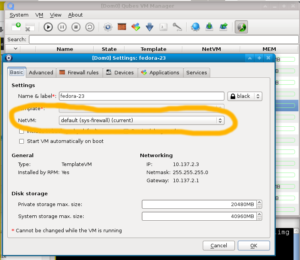
dom0 Terminal Emulator we run the following command: truncate -s 40G /var/lib/qubes/vm-templates/fedora-23/root.img;fedora-23 TemplateVM and run the following in the terminal: sudo resize2fs /dev/mapper/dmroot;Nothing to do! then most likely you forgot a VM that is based on the fedora-23 TemplateVM running. Normally your screen should print something along the lines of Resizing the filesystem...fedora-23 TemplateVM, and went to the VM Settings window to enable networking by selecting whatever we had there before (for us it was default (sys-firewall)).root.img were of the new extended size.